Sync Your Business Hours with Google Maps
Ensure your website always displays accurate business hours by seamlessly synchronizing with your Google Business Profile using our free plugin.
Business Profile Hours Sync
We needed a way for our clients to be able to manage the opening hours on their websites. We could do it for them, but sometimes they need to make the change with short notice and we might not be available. We could give them instructions for how to edit the website and for how to change the GBP hours themselves, but some of them can’t or don’t want to. Google makes editing your business info simple and a business owner should already have access to their Google Business Profile, so synchronizing the hours published on the website with the Google Maps hours just makes sense.

Key Features of Our Plugin
Our plugin is designed to do one thing – to ensure your business hours are always accurate.
01
Automatic Google Updates
02
Easy Shortcode Integration
Getting Started
with Business Profile Hours Sync
How to get started with synchronizing your Google Business hours with your website using our plugin. Follow these simple steps to get started.
1
Install the Plugin
Either search for and install the plugin from the WordPress repository or Download it here and upload the .zip file to your WordPress installation directly through the WordPress plugins screen.
2
Activate the Plugin
Navigate to the Plugins screen in WordPress and activate the Business Profile Hours Sync plugin to start using it.
3
Configure Settings
Enter your Google Business ID and Google Places API key in the plugin settings. Use the shortcode [google_business_hours] to display hours on your site.
Common Questions about GBP Hours Sync
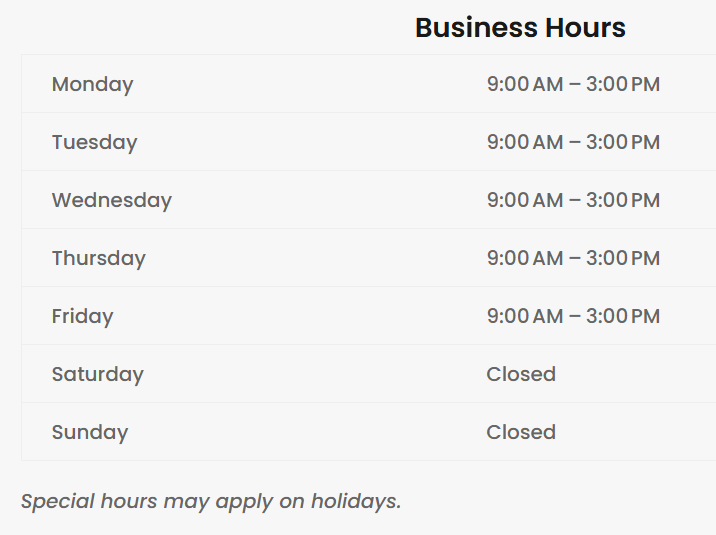
Screenshot of the hours output
What does it cost?
It is free. We may consider making a paid version with more features in the future.
How do I find my Google Business ID?
You can locate your Google Business ID by accessing your Google Business Profile dashboard or checking your Google Maps listing URL.
Can I customize the appearance of the hours?
Absolutely! Use CSS to adjust colors, fonts, and layout to match your website’s design.
A method for changing the appearance of the output is a planned feature for a future version of the plugin.
Is there a limit to the number of updates?
The plugin updates your business hours automatically every 12 hours, minimizing API calls while keeping your information current.
The ability to adjust the frequency of update may be added in the future.
What are the system requirements?
The plugin requires WordPress 5.0 or higher and PHP 7.4 or higher to function properly.
Download Business Profile Hours Sync Today!
Enhance your website with real-time business hours synchronization. Download our free plugin now and keep your customers informed.
Support Our Plugin Development
Your contributions help us enhance the Business Profile Hours Sync plugin, ensuring it remains a valuable tool for synchronizing your business hours with Google Maps. Every donation supports ongoing development and future features. Thank you for your generosity!